
plug








Run a local process as if it were inside your cluster: prefix any command
with plug and it resolves the cluster DNS and reaches the cluster services like
any workload of the stack - no code change, no proxy configuration in your app. One
tiny agent container on the cluster side, one static CLI on yours. Docker, Swarm, Kubernetes
and OpenShift.
Use cases
Stories from a developer's day, each with the commands that tell it. They all rest on the same
thing: your process runs on your machine and is a member of the cluster, in both directions
(how it works). The names below, demo for the
profile, orders or web for a service, are examples.
- First day on a project
- The bug only the cluster shows
- A front end on the laptop, the back end in the cluster
- QA tries the feature before the pull request
- Front end and back end, one feature
- Several AI agents, one feature
- The real data, in your own tools
- Staging and pre-production, side by side
- An AI agent that knows the cluster
- A cluster driven by Argo CD
- Teams, with Meerkat
First day on a project
You join a team. Its dev cluster admits its members by approval, and the tech lead gives you one thing: the agent's address. You paste the install line with it:
ssh -p 2222 -o StrictHostKeyChecking=no -o UserKnownHostsFile=/dev/null get@10.0.4.20 install demo | shThe installer puts plug on your machine, then presents the machine to the cluster, which records the request and says what to ask for:
plug: demo admits its members by approval. Your request is registered.
      Ask a member to run:
        plug -p demo accept 9kcQ2m7xT4bW
      or to pick you in: plug -p demo requests
Members: alice, bobYou paste that line to the tech lead, who runs it from their own machine:
plug -p demo accept 9kcQ2m7xT4bWTwo minutes later, you clone the service you were hired for and start it:
git clone git@git.example.com:shop/orders.git && cd orders
plug -p demo -s orders:8080:3000 npm run start:dev
Your orders runs on your laptop and calls users,
payments, postgres and kafka by their names, the team's
own, with this morning's data. The rest of the cluster calls your orders in turn.
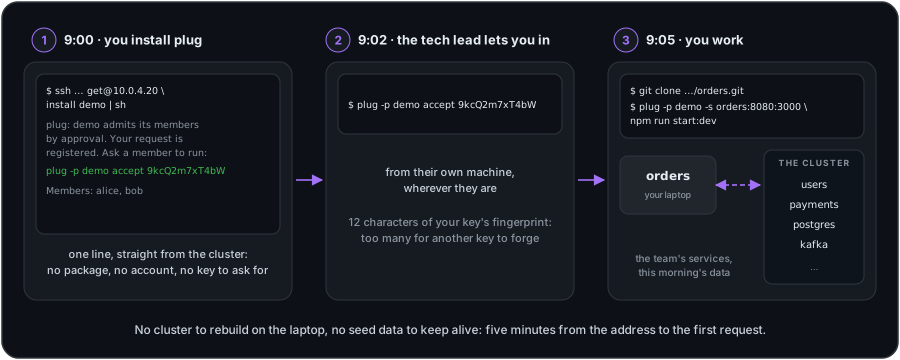
Without plug: a cluster to rebuild on the laptop, from compose files that drift from the real one, a seed script for data nobody trusts, and a few days before the first useful request. Then every service the team adds is one more to run locally.
The bug only the cluster shows
A request fails in the dev cluster and nowhere else: it takes the real data, the real
configuration, the real neighbours. You start orders under your debugger, in its
place:
plug -p demo -s orders:8080:3000 npm run start:debug-
The deployed
ordersis parked for the session. Whatever callsordersin the cluster,web, a consumer, a cron job, now lands on your process: you reproduce the failing request from the real front end, and the breakpoint hits. -
Your process gets the environment of the
ordersit replaces, secrets included, and its volumes, mounted live. It behaves as the deployed one does, with nothing copied into a.env.--no-env DB_URLkeeps one variable at your local value. -
Ctrl-C and the deployed
ordersanswers again. Nothing was redeployed, before or after.
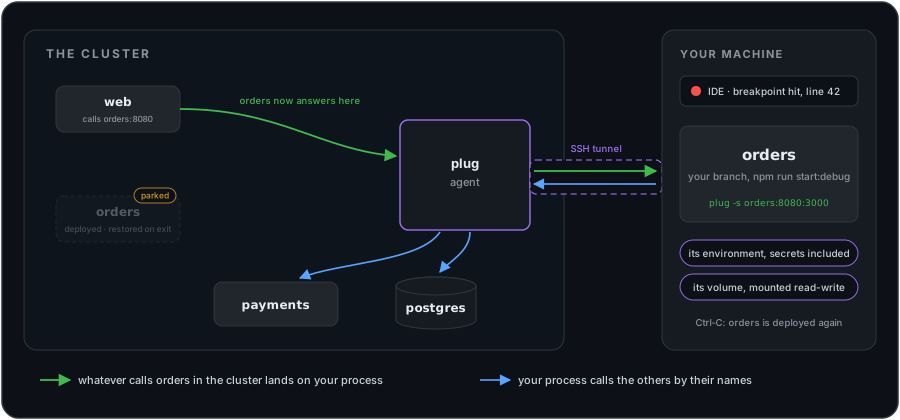
The same session, in other shapes:
-
A service that does not exist yet.
plug -p demo -s pricing:8080:3000 npm run start:devgives the cluster a name it did not have: the other services can callpricingbefore it has a manifest. -
The image, as it will ship.
plug -p demo -s orders:8080:8080 --dockerrun docker run --rm orders:my-branchruns your container, unmodified, as the cluster member. -
The service's files. From another terminal,
plug mountssays where its volumes are on your machine: open them in your editor, they are the live ones.
Running it from the IDE: see From your build tool.
A front end on the laptop, the back end in the cluster
You work on the front end only. Its dev server proxies /api to
http://api:8080, the address it has in the cluster, and you start it as a pure
client:
plug -p demo -c npm run dev
The dev server is the process plug runs, so it is the one that resolves the cluster's names;
your browser talks to it on localhost as usual. No URL per environment, no
port-forward to keep open, and the back end is the whole one, not a mock.
QA tries the feature before the pull request
Your feature works on your machine. Before you open the pull request, someone has to try it: QA, or the business who asked for it. They know the test platform's address, and nothing about your machine, which sits behind a firewall, a NAT, a VPN. You serve the front end from your branch:
plug -p test -s web:80:4200 npm start
They open the test platform as they always do, with its usual address and its usual sign-in:
the ingress sends web to your process. The tunnel was opened by your machine,
outbound, so nothing has to route to it. A remark? You fix it, save, and their next reload
has it. Once they are happy: Ctrl-C, commit, push, pull request.
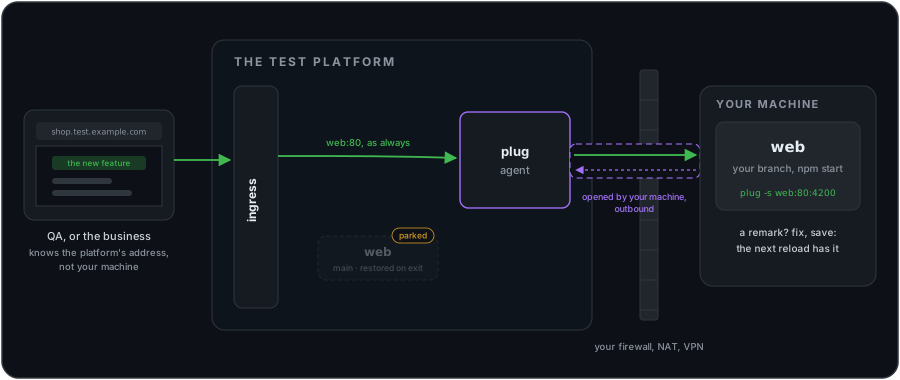
- Everyone on the platform gets your version for the session: a name is served by one process at a time. Say so in the team's channel, or let Meerkat tell them.
-
A dev server that checks the
Hostheader refuses the platform's address until it is allowed:server.allowedHostsin Vite,--allowed-hostsonng serve.
Without plug: a build and a deployment to the test platform for every round of remarks, or a preview environment per branch to build and keep running.
Front end and back end, one feature
Alice writes the screen, Bob the endpoint behind it, each on a branch of their own and a machine of their own. They meet in the dev cluster. Bob serves the back end from his branch, in watch mode:
plug -p demo -s api:8080:3000 npm run start:dev
Alice serves the front end from hers. Her dev server proxies /api to
http://api:8080, the address it has in the cluster, which is now Bob's process:
plug -p demo -s web:80:4200 npm start
Alice needs GET /orders/:id/lines. She says so; Bob writes it and saves, his
process reloads, and Alice's next call reaches it. A field missing, a status code to change:
the same round, in seconds, while Bob's code reads the cluster's real database. When the
screen works, QA opens it on the platform
(as above), and each opens a pull request.
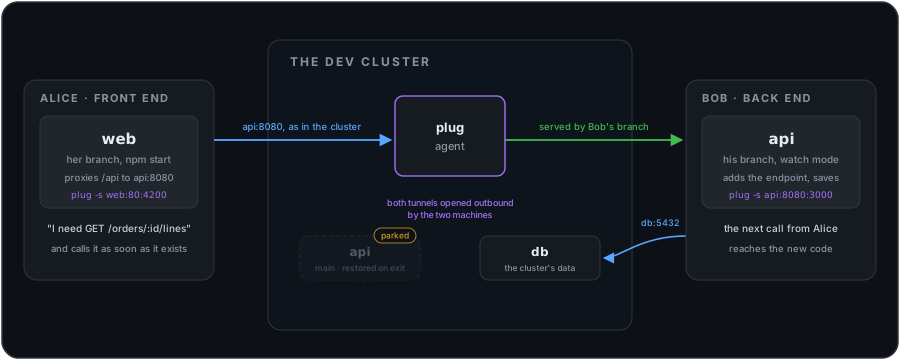
- Neither machine reaches the other: both tunnels are opened outbound, to the cluster. Alice and Bob can be on two networks, two VPNs, two countries.
-
The whole cluster gets Bob's
apifor the session, Alice and everyone else. On a cluster shared beyond the two, say so in the team's channel, or let Meerkat show it. -
Alice only consuming, not showing the screen to anyone?
-cinstead of-s web:80:4200: her dev server still reaches Bob'sapi.
Without plug: a mock of the endpoint until Bob's branch is deployed, then a deployment of Bob's branch for every change Alice asks for, or both of them running the whole stack on their machines.
Several AI agents, one feature
The same collaboration, with coding agents doing the writing: one on the back end, one on the front end, each in its own worktree, on one machine or on several. Each one shares its work on the platform the moment it runs: its process is the real service for the others, and for whoever opens the platform. The back-end agent runs its server under plug, on a port plug picks so that two agents on one machine do not collide:
plug -p demo -s api:8080:PORT npm run start:dev -- --port={PORT}and the front-end agent runs its dev server, which reaches that api:
plug -p demo -c npm run dev
Each agent tests against the other's code as it is written, with the cluster's data, and
through plug's MCP server each one reads
doctor, the environment a deployed service runs with, or whether a name exists,
instead of guessing.
- Each agent its own services. A name is served by one process at a time: give each agent the services that are its part of the feature, and the others use them.
- With Meerkat, each agent's run shows as a session of its own, with the services it serves, under the name of the developer whose machine runs it.
Without plug: each agent works against mocks of what the others write, and the pieces meet for the first time after the pull requests are merged.
The real data, in your own tools
Your database client, your GUI, your scripts reach the cluster's data by name:
plug -p demo -c psql -h postgres -U orders
plug -p demo -c mongodb-compassA one-off script can run with a service's own credentials, read from the deployed workload, without parking it and without copying a password anywhere:
plug -p demo -c --env-of orders python scripts/backfill.pyThis is the cluster's data, not a copy: what the script writes, the team reads.
Staging and pre-production, side by side
The bug shows on pre-production and not on staging. You run the same commit against both, in two terminals, and compare:
plug -p staging -s orders:8080:PORT npm run start:dev -- --port={PORT}
plug -p preprod -s orders:8080:PORT npm run start:dev -- --port={PORT}
PORT lets plug pick a free local port for each session and write it where
{PORT} stands, so the two do not collide. Each process resolves the
names of its own cluster. More in
Profiles & versions.
An AI agent that knows the cluster
One line gives your coding agent plug's view of every cluster this machine knows:
claude mcp add --scope user plug -- plug mcp
Ask it why orders does not reach its database when you plug it, and it reads
doctor check by check, the environment the deployed orders runs
with, whether a name exists in the cluster, then proposes the fix instead of guessing. Other
agents and the tools: MCP.
A cluster driven by Argo CD
Argo CD keeps every object equal to the repository, so it puts back the Service your session repointed, a few minutes in, and the name quietly stops answering on your machine. Tell it, once, to leave the two fields plug changes alone, and plug sessions live beside GitOps. The setting for Argo CD, Flux, Fleet and Crossplane: CD & GitOps.
Teams, with Meerkat
When the cluster sits behind Meerkat, the agent runs inside the gateway and every session belongs to a person the gateway knows.
Arriving, and leaving
An administrator gives your account the dev capability. You install plug with the
command the gateway shows, give this machine its own key, and deposit the public half on your
profile:
ssh -p 22222 -o StrictHostKeyChecking=no -o UserKnownHostsFile=/dev/null get@gateway.example.com install my-app | sh
plug keygen -p my-app
plug pubkey -p my-appOne key per workstation: a second machine deposits a second key, and removing one closes that machine alone. When you leave the project, removing your key or your capability closes the door at the next connection. No shared key to rotate, no certificate to wait out.
Everybody sees who serves what
Back to the review on the test platform, through Meerkat. The tester signs in, and before the application opens, the gateway names what is substituted and by whom. Then a strip says it again on every page, live:
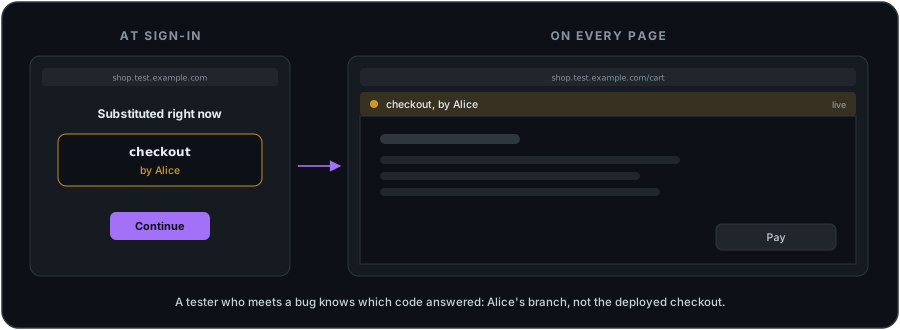
A bug report then says which code answered: Alice's branch, not the deployed
checkout. And a name already served is refused to a second developer, with the
name of who holds it.
Opening the door
Two switches, two owners: the application's administrator turns on developer mode, and the infrastructure administrator opens the developer tunnel, which ships closed. The tunnel runs only when both are on, and taking either back closes it.